
此页面的默认 H1 标题
效果展示
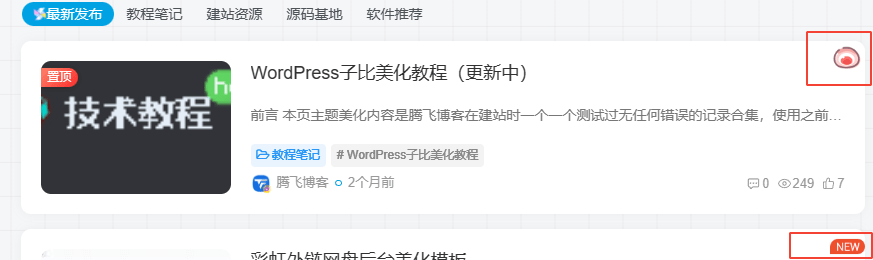
代码部署
PHP代码
在子比主题目录下“func.php”(子比主题推荐放这里)或者“functions.php”,在合适位置放下面PHP代码
/**
* 新文章发布New小图标
*/
function wiiuii_post_newicon($post){
    //date_default_timezone_set('PRC');
    $wiui_date = date("Y-m-d H:i:s");
    $wiui_post_date = get_the_time('Y-m-d H:i:s', $post);
    $wiui_diff = (strtotime($wiui_date)-strtotime($wiui_post_date))/3600;
    if($wiui_diff<24){
        $wiui_new_icon = '<div class="wiiuii-new-icon"><img src="自行更换" draggable="false" alt="最新文章" /></div>';
    }else if (is_sticky()){
        $wiui_new_icon = '<div class="wiiuii-new-icon"><img src=自行更换喜欢的图片" draggable="false" alt="置顶文章" /></div>';
    }else{
        $wiui_new_icon = '';
    }
    //开始输出
    return $wiui_new_icon;
}
上面《img》标签中icon图标链接自己修改。
在子比主题目录下“/zibll/inc/functions/zib-posts-list.php”文件中,大概440行的文章放入下面PHP代码(看图)
$html .= wiiuii_post_newicon($post);//新文章+置顶文章icon图标函数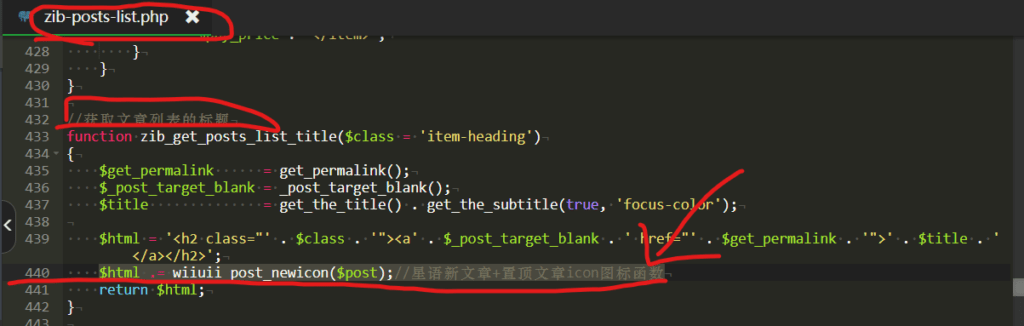
CSS代码
/*新文章发布图标样式*/
.posts-item{position: relative !important;}
.wiiuii-new-icon{position: absolute;height: 35px;right: 0;top: 0;}
.wiiuii-new-icon img{-webkit-user-drag: none;}
 加入QQ群
加入QQ群
 关注微信公众号
 联系我们
联系我们
 请求更新
请求更新